# stringr  [](https://cran.r-project.org/package=stringr)
[](https://github.com/tidyverse/stringr/actions/workflows/R-CMD-check.yaml)
[](https://app.codecov.io/gh/tidyverse/stringr?branch=main)
[](https://lifecycle.r-lib.org/articles/stages.html#stable)
## Overview
Strings are not glamorous, high-profile components of R, but they do
play a big role in many data cleaning and preparation tasks. The stringr
package provides a cohesive set of functions designed to make working
with strings as easy as possible. If you’re not familiar with strings,
the best place to start is the [chapter on
strings](https://r4ds.hadley.nz/strings) in R for Data Science.
stringr is built on top of
[stringi](https://github.com/gagolews/stringi), which uses the
[ICU](https://icu.unicode.org) C library to provide fast, correct
implementations of common string manipulations. stringr focusses on the
most important and commonly used string manipulation functions whereas
stringi provides a comprehensive set covering almost anything you can
imagine. If you find that stringr is missing a function that you need,
try looking in stringi. Both packages share similar conventions, so once
you’ve mastered stringr, you should find stringi similarly easy to use.
## Installation
``` r
# The easiest way to get stringr is to install the whole tidyverse:
install.packages("tidyverse")
# Alternatively, install just stringr:
install.packages("stringr")
```
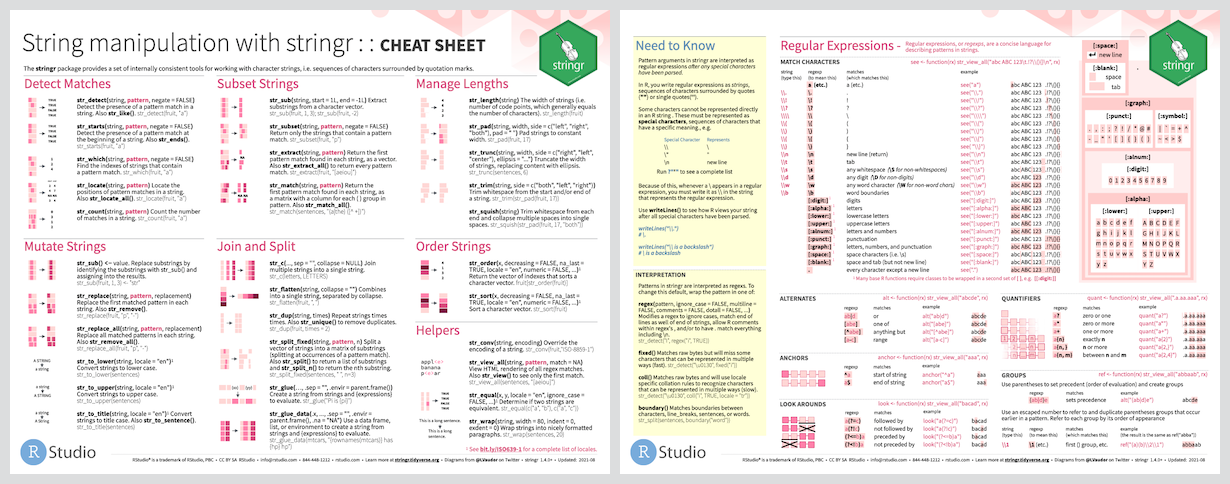
## Cheatsheet
 ## Usage
All functions in stringr start with `str_` and take a vector of strings
as the first argument:
``` r
x <- c("why", "video", "cross", "extra", "deal", "authority")
str_length(x)
#> [1] 3 5 5 5 4 9
str_c(x, collapse = ", ")
#> [1] "why, video, cross, extra, deal, authority"
str_sub(x, 1, 2)
#> [1] "wh" "vi" "cr" "ex" "de" "au"
```
Most string functions work with regular expressions, a concise language
for describing patterns of text. For example, the regular expression
`"[aeiou]"` matches any single character that is a vowel:
``` r
str_subset(x, "[aeiou]")
#> [1] "video" "cross" "extra" "deal" "authority"
str_count(x, "[aeiou]")
#> [1] 0 3 1 2 2 4
```
There are seven main verbs that work with patterns:
- `str_detect(x, pattern)` tells you if there’s any match to the
pattern:
``` r
str_detect(x, "[aeiou]")
#> [1] FALSE TRUE TRUE TRUE TRUE TRUE
```
- `str_count(x, pattern)` counts the number of patterns:
``` r
str_count(x, "[aeiou]")
#> [1] 0 3 1 2 2 4
```
- `str_subset(x, pattern)` extracts the matching components:
``` r
str_subset(x, "[aeiou]")
#> [1] "video" "cross" "extra" "deal" "authority"
```
- `str_locate(x, pattern)` gives the position of the match:
``` r
str_locate(x, "[aeiou]")
#> start end
#> [1,] NA NA
#> [2,] 2 2
#> [3,] 3 3
#> [4,] 1 1
#> [5,] 2 2
#> [6,] 1 1
```
- `str_extract(x, pattern)` extracts the text of the match:
``` r
str_extract(x, "[aeiou]")
#> [1] NA "i" "o" "e" "e" "a"
```
- `str_match(x, pattern)` extracts parts of the match defined by
parentheses:
``` r
# extract the characters on either side of the vowel
str_match(x, "(.)[aeiou](.)")
#> [,1] [,2] [,3]
#> [1,] NA NA NA
#> [2,] "vid" "v" "d"
#> [3,] "ros" "r" "s"
#> [4,] NA NA NA
#> [5,] "dea" "d" "a"
#> [6,] "aut" "a" "t"
```
- `str_replace(x, pattern, replacement)` replaces the matches with new
text:
``` r
str_replace(x, "[aeiou]", "?")
#> [1] "why" "v?deo" "cr?ss" "?xtra" "d?al" "?uthority"
```
- `str_split(x, pattern)` splits up a string into multiple pieces:
``` r
str_split(c("a,b", "c,d,e"), ",")
#> [[1]]
#> [1] "a" "b"
#>
#> [[2]]
#> [1] "c" "d" "e"
```
As well as regular expressions (the default), there are three other
pattern matching engines:
- `fixed()`: match exact bytes
- `coll()`: match human letters
- `boundary()`: match boundaries
## RStudio Addin
The [RegExplain RStudio
addin](https://www.garrickadenbuie.com/project/regexplain/) provides a
friendly interface for working with regular expressions and functions
from stringr. This addin allows you to interactively build your regexp,
check the output of common string matching functions, consult the
interactive help pages, or use the included resources to learn regular
expressions.
This addin can easily be installed with devtools:
``` r
# install.packages("devtools")
devtools::install_github("gadenbuie/regexplain")
```
## Compared to base R
R provides a solid set of string operations, but because they have grown
organically over time, they can be inconsistent and a little hard to
learn. Additionally, they lag behind the string operations in other
programming languages, so that some things that are easy to do in
languages like Ruby or Python are rather hard to do in R.
- Uses consistent function and argument names. The first argument is
always the vector of strings to modify, which makes stringr work
particularly well in conjunction with the pipe:
``` r
letters %>%
.[1:10] %>%
str_pad(3, "right") %>%
str_c(letters[2:11])
#> [1] "a b" "b c" "c d" "d e" "e f" "f g" "g h" "h i" "i j" "j k"
```
- Simplifies string operations by eliminating options that you don’t
need 95% of the time.
- Produces outputs than can easily be used as inputs. This includes
ensuring that missing inputs result in missing outputs, and zero
length inputs result in zero length outputs.
Learn more in `vignette("from-base")`